
How to choose render engine for the conversion by using FlipBook Creator Professional?
Question:
Hi,I have used FlipBook Creator Professional for at least two years. How can I choose different kinds of render engine to import PDF document? As we all know, choosing different render engine will affect the page quality of flipbook. So I have the issue: How to choose render engine for the conversion by using FlipBook Creator Professional?
Answer:
FlipBook Creator Professional is a professional software which enables readers and users to create flash flip book from simple PDF document.FlipBook Creator Professional enalbes you to promote your paper books in a modern digital flip book format. It also enables you to publish to the web or CD/DVD. Your readers or users can also view your reader on any device. FlipBook Creator Professional is of great help in creating, sharing and viewing attractive flash flip book or digital catalogs with page-turning effect from PDF and MS Office files.
Here are the detailed steps to select different render engines:
Step 1:Create FlipBook
First of all, you need to launch FlipBook Creator Professional.
- 1.Download: Download FlipBook Creator Professional from our website.
- 2.Import: Start to import PDF document to FlipBook Creator Professional. Click the button of "SWF" to jump to another window and choose one you like.
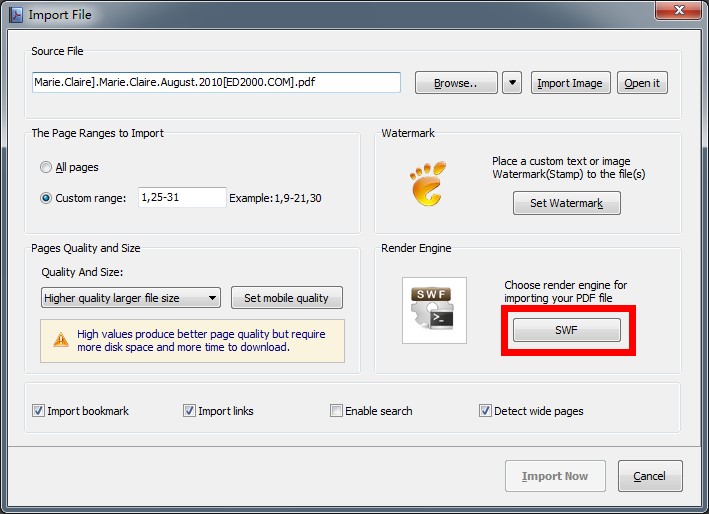
Step 2: There are three different render engines available to you: SWF, GPL Ghostscript, Inner Lirary.Choose the suitable one by yourself.
